Urban Traffic Navigator

Relaxpeak Labs
2026-07-21
Driving Arcade Traffic Navigation

Reviews

Urban Traffic Navigator succeeds by giving each drive a purpose. The mission-based structure turns what could be aimless cruising into a series of engaging challenges. Upgrading your vehicle adds a satisfying layer of strategy, and the controls feel responsive on both keyboard and touch. The city traffic patterns keep you alert without feeling unfair. It is a well-balanced arcade experience that respects your time and rewards careful driving.

About This Game

Urban Course Design

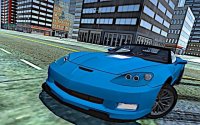
The city streets in Urban Traffic Navigator are designed to present a steady flow of obstacles and opportunities. Players must weave through moving vehicles, navigate intersections, and maintain control at varying speeds. The environment is crafted to feel alive, with traffic patterns that require constant attention. Unlike open-road racers, this game focuses on tight spaces and sudden changes, making each trip through the city a test of precision. The layout encourages players to learn common routes and anticipate where congestion might build up.

Mission Structure and Rewards

Rather than simply driving endlessly, Urban Traffic Navigator provides a series of clear objectives. These missions might include reaching a destination within a time limit, avoiding a certain number of collisions, or collecting items scattered along the route. Completing tasks awards in-game currency that can be used to improve your vehicle. This structure gives each session a purpose, pushing players to refine their technique rather than just wander. The variety of mission types helps keep the experience from becoming repetitive.

Vehicle Enhancement Options

Earnings from successful missions can be invested in your car's performance. Upgrades typically focus on areas like acceleration, top speed, and handling responsiveness. Improving handling is often a wise early choice, as it makes dodging through traffic more manageable. Later upgrades allow players to take on missions that demand higher speeds or tighter cornering. This progression system adds a strategic element, as players decide which upgrades best suit their driving style and the challenges ahead.

Controls and Accessibility

The game is built for immediate play without any installation. Controls are designed to be intuitive, with keyboard inputs for desktop users and touch controls for mobile devices. The interface is clean, showing your current mission objective and progress clearly. Full-screen mode is available for those who want a more immersive view. Because the game runs in a browser, it works well for short play sessions during breaks or longer periods of focused driving. The learning curve is gentle, allowing new players to get started quickly while still offering depth for those who want to master the traffic patterns.


โœ… Compatibility & Testing

โ€ข Desktop (Windows 11, macOS Ventura)
โ€ข Mobile (iPhone 14, Samsung Galaxy S23)
โ€ข Tablet (iPad Pro, Android tablet)
โœ…Supported browsers: Chrome, Safari, Edge, Firefox (latest versions)
โŒ Not supported: Internet Explorer, older browser versions

Faq

What platforms can I play Urban Traffic Navigator on?
Urban Traffic Navigator runs directly in web browsers on both desktop computers and mobile devices. There is no need to download any software or app. Simply open the game page and start playing immediately.
Is there a way to pause the game during a mission?
Most browser-based arcade games include a pause feature, and Urban Traffic Navigator likely offers one. Look for a pause button or menu option on the screen. This allows you to take a break without losing progress in the middle of a mission.
Can I play Urban Traffic Navigator offline?
Since the game is designed for browser play, it typically requires an active internet connection to load and run. Once loaded, some games may allow limited offline play, but for full functionality and to save progress, an internet connection is recommended.
Are there different vehicles to choose from?
The game focuses on upgrading a single vehicle rather than offering multiple cars to select. As you earn currency from missions, you can enhance your current vehicle's performance attributes such as speed and handling. This creates a sense of progression with one main vehicle.
How long does a typical mission take to complete?
Mission lengths vary, but most are designed for quick play sessions. A typical mission might last anywhere from one to five minutes, depending on the objective and traffic conditions. This makes the game suitable for short breaks or longer play periods.
Does the game save my progress automatically?
Many browser games use cookies or local storage to save progress. Urban Traffic Navigator likely saves your earned currency and upgrade levels automatically so you can continue from where you left off on the same device. Progress may not transfer between different devices.

Similar Games

Comments

0 comments
U
User
Loading comments...